Guides ·
Split tunneling on Android, per app and per provider
Split tunneling means some of your traffic uses the VPN and some doesn’t. On Android, many VPN apps offer it per app. You pick the apps that skip the VPN, or the only apps that use it.
That choice is VPN or no VPN. Every app that does use the VPN leaves through the same server, in the same country, from the same provider. Switch to another country and every app moves with it.
un/braid makes a different choice per app: not only whether it uses a VPN, but which exit. Your browser can leave from the United States, your maps from Italy, everything else from the Netherlands, and your banking app can skip the VPN. All at the same time.
Android runs one VPN app at a time
Android allows one active VPN app per user profile. When you start a second one, the first disconnects. So you can’t run your NordVPN app next to your Mullvad app, or the Tailscale app next to either of them.
un/braid works inside that rule. It is the one VPN app Android runs, and it keeps several connections open inside it. We call each one an exit.
How un/braid sends each app its own way
Android tells un/braid which app opened each connection. un/braid then sends that connection out through the exit you picked for that app.
- The default route is for every app you haven’t placed anywhere else.
- A route is a group of apps with its own exit: a country, a city or one exact server from a provider, your own server, or a Tailscale exit node at home.
- Direct apps leave without a VPN exit.
Each route can use a different provider. The default route is on whenever un/braid is connected; other routes connect once apps are assigned to them. Routes on the same server, with the same settings and login, share one connection.
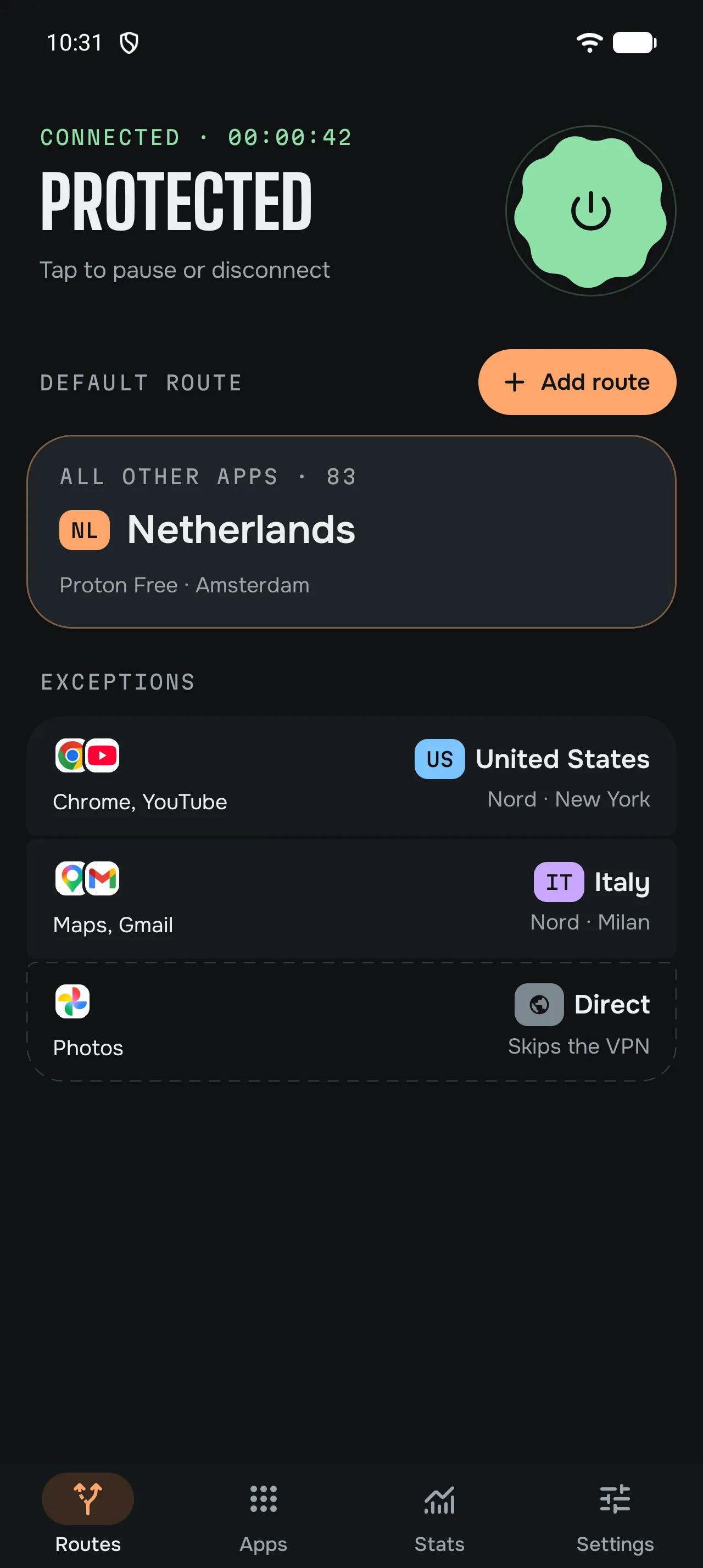
Set it up
- Add a connection. The first run asks for one; later, it’s under Settings, Providers & servers, Add connection. Sign in to a built-in provider, add a key or config from your provider, or import a WireGuard or OpenVPN file or a Shadowsocks key. The providers page says which providers need what.
- Pick the default exit. In Routes, open the default route and tap Change location. Choose a country, a city or a server. This is where most of your apps go.
- Add routes for the exceptions. In Routes, tap Add route and choose its exit, with the same provider or another one.
- Assign apps. In Apps, tap an app and choose its route, or Direct if it refuses to work over a VPN, like some banking apps.
- Connect. The first time, Android asks you to allow the VPN.
Where lookups go
When a routed app looks up a website’s address, the lookup goes through that app’s own exit. It uses your provider’s DNS, the custom DNS you set, or Quad9 through the tunnel when neither is set. So websites usually see the country of the exit you picked for that app.
Some lookups work differently:
- Direct apps, and names on your local network, use your normal network’s DNS.
- To open a tunnel, un/braid may look up your VPN server’s address on your normal network.
- Apps with their own encrypted DNS do their lookups themselves, normally through their own exit.
- If you set Android’s Private DNS to a provider, Android may use it instead of un/braid’s DNS.
When an exit stops working
un/braid checks provider exits about once a minute. After three failed checks in a row, it tries another server in the same location. That’s an attempt, not a promise: a location can run out of working servers.
Some exits are never moved: servers you pinned, configs you imported, Dedicated IPs and Tailscale exit nodes. While un/braid stays connected, apps on a failed exit don’t switch to Direct; they wait for the exit to work again. Moving an exit can briefly reconnect your other routes too.
Know the limits
- Android 13 or newer, on a 64-bit ARM phone.
- IPv4 only. Apps that go through un/braid can’t use IPv6, so it can’t slip around the tunnel. Apps set to Direct normally keep IPv6.
- You bring the VPN. un/braid provides no servers. You need a subscription with each provider you use, or your own server.
- Device limits still count. Each exit you open is a connection to your provider, and its device limit applies.
- If un/braid stops or pauses, Android uses your normal connection, unless you turn on Android’s Block connections without VPN. Then apps stay offline until un/braid is back. While it’s connected, Direct apps still go out without a VPN, as you asked.
Read the details on the security page. For what has carried real traffic in our tests, see Tested live.
Questions
Is un/braid a VPN service? No. It’s a free, open-source VPN client. It connects to providers you already use, or to your own server.
Can I keep using my provider’s app? Not at the same time. Android runs one VPN app, so un/braid replaces it while it’s on.
Can two apps use two different providers? Yes. That’s the point. See two VPNs at once on Android.